Bulk Delete Google Workspace Groups from Sheets

SheetOps Google Sheets Add-on
This guide is for the official SheetOps add-on. Install it to manage Google Workspace at spreadsheet speed.
Cleaning up deprecated mailing lists, project distribution lists, and obsolete security groups in the Google Admin Console is high-risk and slow. SheetOps provides visual staging and validation safeguards in Google Sheets to safely execute bulk Google Group deletions.
Workspace Organization & Security: Deleting a group is a permanent, administrative action. As Google's official Delete a group guidelines warn: "When you delete a group, the group can't be restored. Members don't have access to files or anything else shared in the group. Also, messages sent to the group's address are not delivered." SheetOps provides a visual staging safety net to verify your selections before executing these permanent API calls.
Quick Answer: To bulk delete Google Workspace groups with SheetOps: export your groups to a sheet, change their Status to Deleted, select the Apply Changes checkboxes, and execute the update. This immediately deletes the groups from your Google Workspace domain.
Understanding Group Deletion Mechanics
Changing a group's status to Deleted in the spreadsheet instructs SheetOps to make a delete API call to the Google Directory API's groups.delete endpoint. SheetOps applies these updates sequentially and logs the status of each deletion directly in the spreadsheet in real time.
Google Admin Console vs. GAM vs. SheetOps for Group Deletion
While you can delete groups manually in the Google Admin Console or write terminal scripts using GAM, SheetOps provides a safer, faster way to manage group deletions at scale:
| Criteria | Admin Console | GAM CLI | SheetOps |
|---|---|---|---|
| Bulk Operations | Manual deletion in console or rigid CSV uploads | Scripted command-line commands | Familiar copy-paste and fill-handle drag in spreadsheets |
| Safety Net | None (deletions are immediately executed) | None (deletions are immediately executed) | Live validation and visual staging (highlighted in yellow) |
| Change Tracking | Admin audit logs in console | Command line output logs | Real-time status updates directly in the sheet's Change Log column |
How to Bulk Delete Google Workspace Groups
1. Prepare Your Spreadsheet
Go to Extensions → SheetOps → Groups. Selecting this automatically fetches and loads all existing Google Workspace groups in your domain onto the spreadsheet, setting up the required columns, validation rules, and checkboxes.

2. Modify Status to Deleted
In the group sheet, locate the Status column (the third-to-last column):
- For the first group you want to delete, select Deleted from the dropdown menu.
- Bulk Action Tip: Instead of manually selecting the dropdown for every single row, you can select the "Deleted" value on the first row, click and hold the fill handle (the small square in the bottom-right corner of the cell), and drag it down over the other group rows. This instantly copies the Deleted status across all selected rows.
- All cells with pending data or updates will highlight yellow.

Deleting a Google Group is immediate and permanent. Unlike users, Google Workspace does not have a "trash bin" or restorable window for groups. Once a group is deleted, its archives, settings, and memberships are permanently removed and cannot be restored.
3. Selecting Multiple Google Workspace Groups for Deletion
To select all obsolete group targets for immediate removal:
- Click the first checkbox cell in the Apply Changes column alongside your first group row marked for deletion.
- Select all target group rows:
- Mouse Drag: Press and hold while dragging downward across the checkbox cells.
- Shift + Click: Hold Shift on your keyboard and click the final group deletion row in your sheet.
- Tap Spacebar to check all selected group deletion checkboxes in one step.
4. Confirming Destructive Bulk Group Removal
Hitting the Spacebar opens the confirmation modal. Select No (Update) to execute the group removal workflow. SheetOps connects to the groups.delete API endpoint, permanently unbinding the group address, disassembling member rosters, and removing archive data.
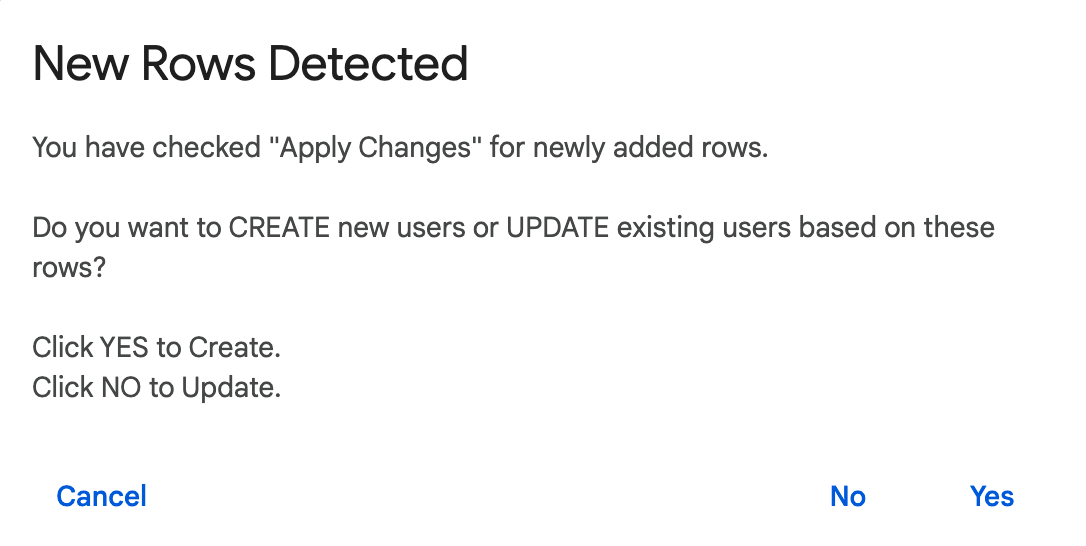
5. Monitoring Group Deletion Statuses and Cleanup Audit Trail
As group removal API requests process in sequence:
- Pending yellow delta background highlights clear row-by-row upon API completion.
- The Change log status column reports real-time deletion outcomes:
- ✓ Deleted (highlighted in soft green) when the group is successfully purged from Google Workspace.
- ✗ error_message (highlighted in soft red) if insufficient admin scopes or API rate limits prevent group deletion.
Troubleshooting & Best Practices
- Permanent Action: Always double-check group emails before applying changes. Group deletions cannot be undone. If you delete a group by accident, you must recreate the group and re-add its members from scratch.
- Email Forwarding: If the group email address is still needed for forwarding, consider changing the group's posting permissions to block new external posts instead of deleting the group entirely.
- Member Impact: Deleting a group removes all nested members and references to that group. If other groups nested this group, those references will fail silently.
- API Limits & Script Timeouts: Due to Google Apps Script's strict 6-minute execution timeout, SheetOps is designed to process batches of 100–200 group deletions at a time. For larger cleanups of 500+ groups, we recommend applying changes in sequential batches to prevent API rate limit issues.
- Admin Permissions: Deleting Google Groups requires administrative access. The admin account running the SheetOps add-on must have super administrator privileges or a delegated role with active group management write scopes (
https://www.googleapis.com/auth/admin.directory.group).
Frequently Asked Questions (FAQ)
Can I restore a deleted Google Group?
No. Google Directory API does not support a restoration endpoint for deleted groups. Group deletions are immediate and final.
What happens to the archived messages of a deleted group?
When a group is deleted, all archives and historical messages stored in Google Groups are permanently deleted and cannot be accessed again.
Can I see who deleted a group in SheetOps?
SheetOps does not store deletion logs. However, all deletions performed via the Admin Directory API are logged in your Google Workspace Admin Audit Log in the Google Admin Console.
Last updated: June 19, 2026

Ready to manage Workspace at spreadsheet speed?
Install SheetOps from the Google Workspace Marketplace today and start performing bulk directory updates, onboarding, and audits directly inside Google Sheets.