
Keep Track of YouTube™ Video & Channel Metrics in Google Sheets™
Stop copy-pasting view counts and jumping between browser tabs. Fetch real-time views, likes, comments, subscribers, and engagement rates for any public video or channel directly into your spreadsheet.

Paste video URLs or IDs in column A, and TubeSheet automatically populates real-time stats across columns.
Tracking YouTube™ Numbers by Hand Is a Recipe for Stale Data
Whether you are preparing client proposals, measuring campaign reach, or keeping an eye on competitor breakouts, manual tracking wastes hours and leaves you one step behind.
Manual copy-pasting burns hours every week
Opening dozens of YouTube tabs to copy views, likes, and comment counts into a spreadsheet is exhausting. By tomorrow, those numbers are already stale, and your reports and proposals are outdated.
YouTube Studio only covers your own channel
Studio gives detailed numbers for videos you own, but it cannot track client creators, sponsored campaigns, or competitor channels. You are left taking manual notes and noticing trends too late.
Enterprise API connectors are priced for big teams
Complex API platforms charge hundreds of dollars a month, enforce fragile connector setups, and complicate basic reporting. All you need is clean, accurate numbers right in your Google Sheet.
The Solution: TubeSheet + Google Sheets™
Google Sheets gives you the exact workflow you already know: sorting, formulas, charts, and filters. TubeSheet connects directly to official YouTube™ APIs so you can fetch real-time metrics for any public channel, calculate engagement rates instantly, and auto-refresh numbers on a background schedule.
Everything You Need to Track YouTube™ at Spreadsheet Speed
Track any public video, channel, or playlist without messy scripts or expensive connectors. All data lands cleanly inside the Google Sheet you already own.
Fetch 25 Video Metrics & Auto-Calculate Engagement
Fetch real-time views, likes, dislikes, comments, durations, publish dates, thumbnail links, and live broadcast status for any public video. TubeSheet computes engagement rate for every row automatically.
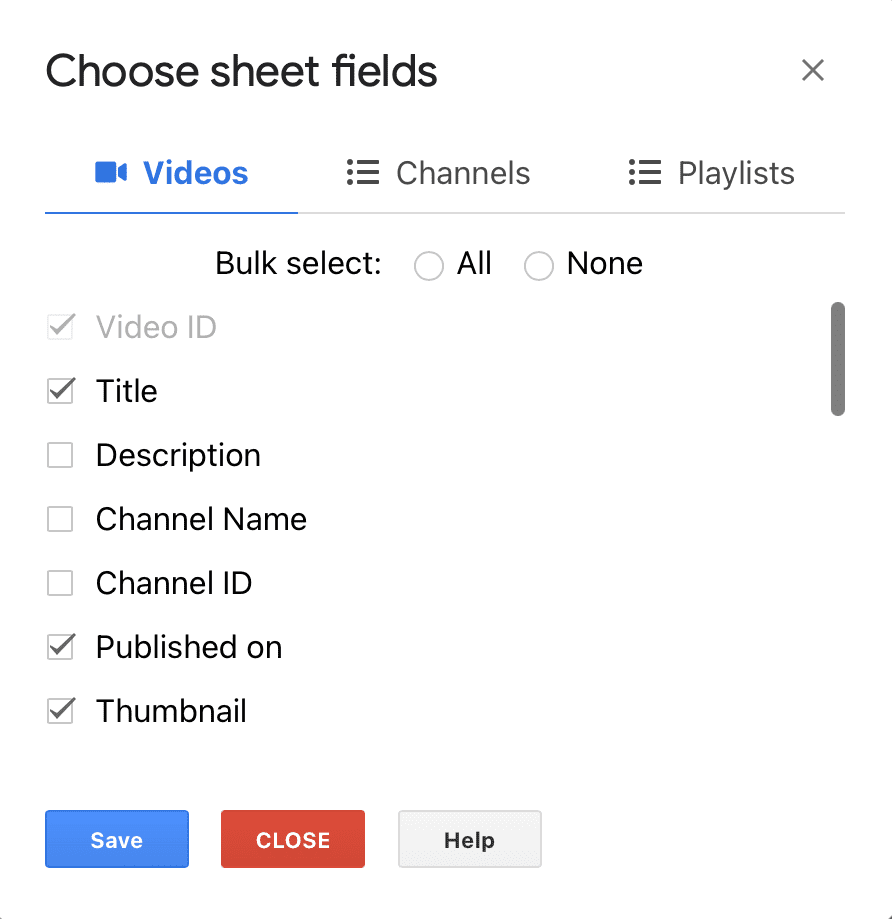
- 25 video data points (8 default, customize in Settings)
- Automatic engagement rate formula: ((Likes + Comments) / Views) × 100
- Speed: exports 1,000 video details in approximately 57 seconds
- Paste video URLs or video IDs directly into column A
Extract Channel Upload Lists in Descending Order
Need to audit a creator’s entire video history? Paste a channel ID and TubeSheet generates a new sheet tab listing all uploads in descending order of upload time, complete with key stats.
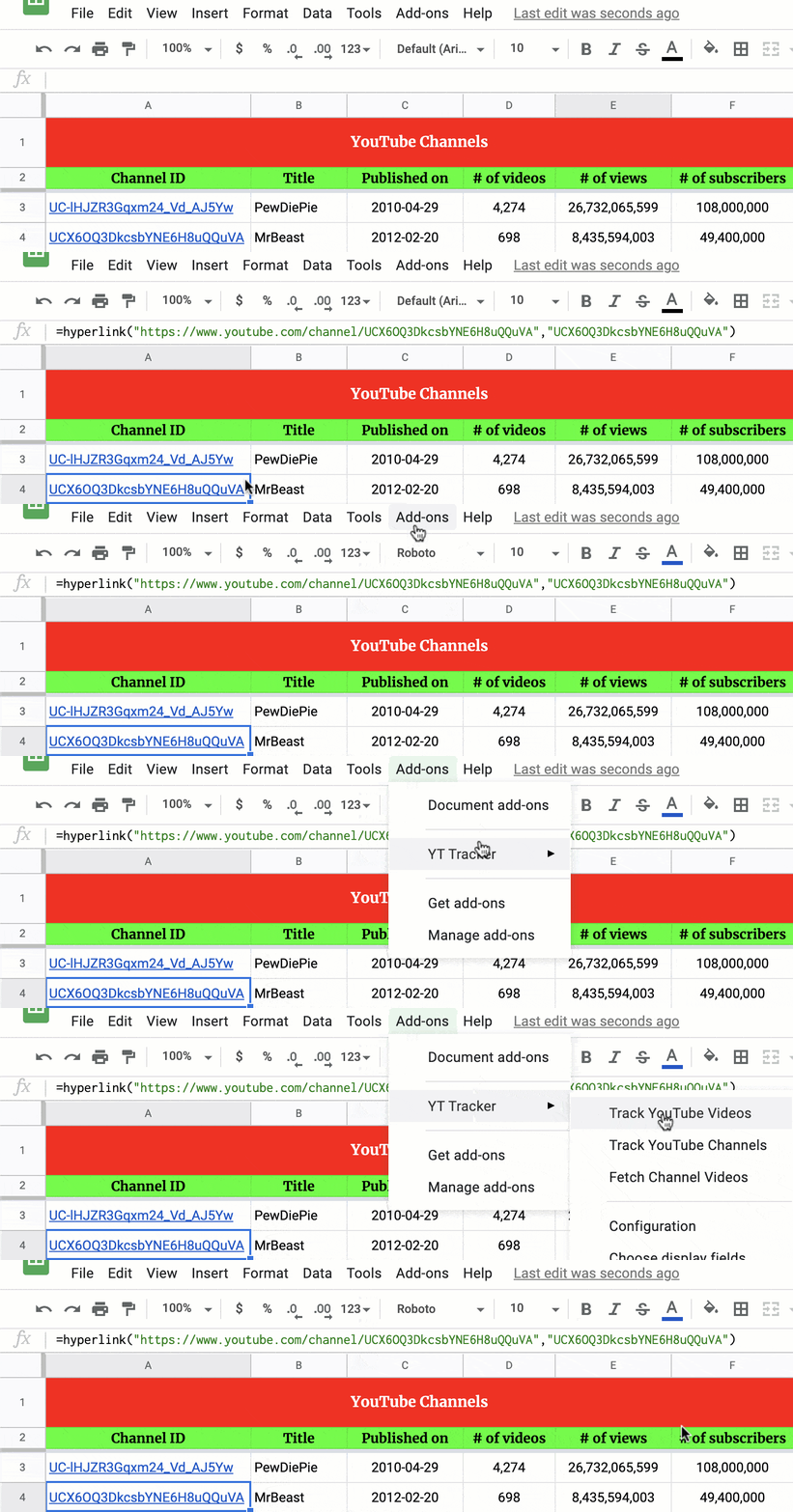
- 11 channel metrics (subscribers, views, video count, banners)
- Lists full upload history in chronological descending order
- Works for any public channel — no channel credentials needed
- Quick list configuration available to accelerate large channel pulls
Scheduled Background Refresh Every 1 to 24 Hours
Set your tracking on autopilot. Configure TubeSheet to refresh metrics every 1, 2, 5, 10, or 24 hours in the background — even when your computer is shut down and the spreadsheet is closed.
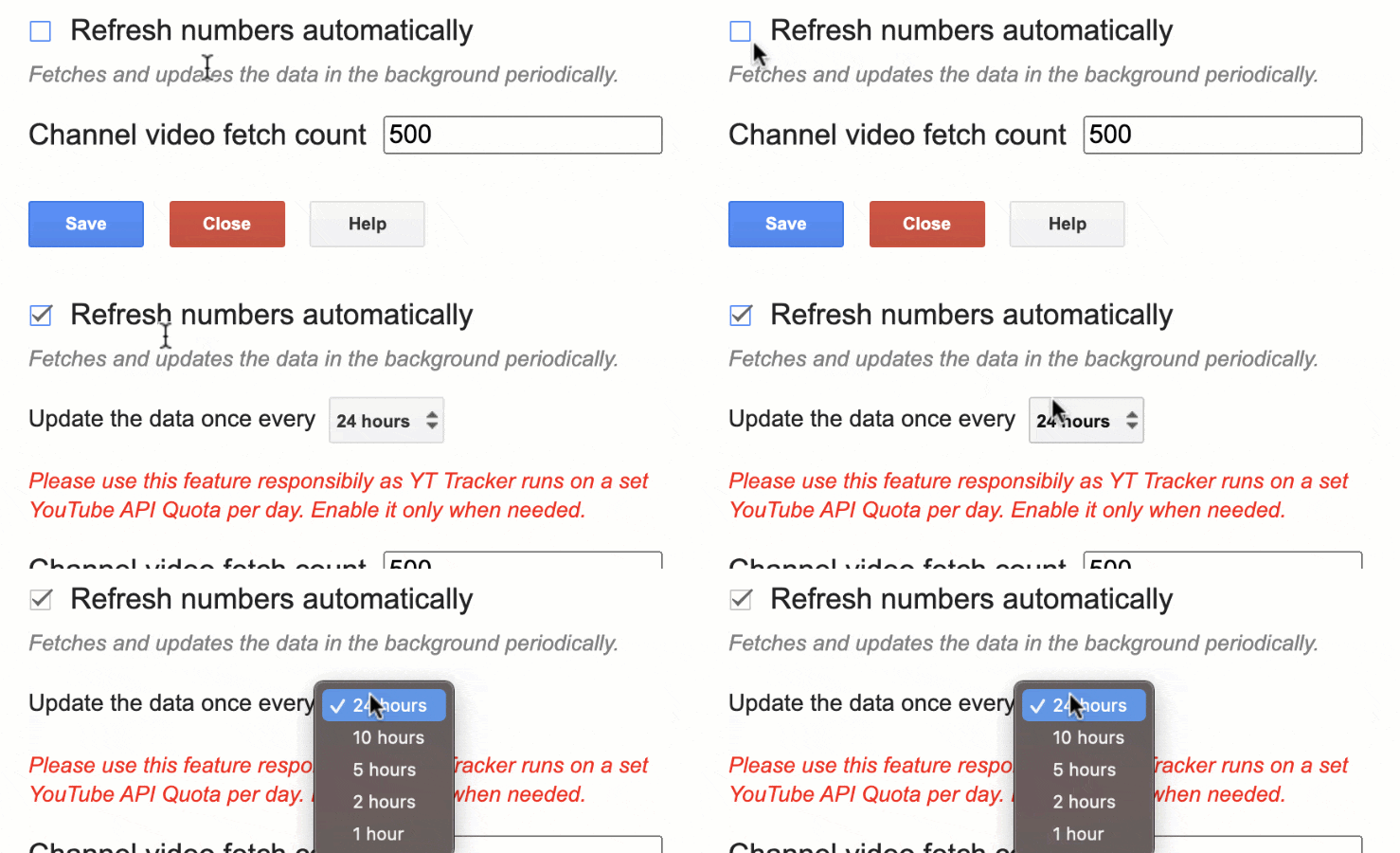
- Background refresh intervals: 1, 2, 5, 10, or 24 hours
- Runs automatically when the spreadsheet is closed
- Optional auto-refresh on sheet open (can be toggled on/off)
- Maintains fresh numbers for automated client reporting and dashboards
Daily Stats: Measure What Each Video Gained Today
Totals alone do not show velocity. TubeSheet’s Daily Stats feature logs how many views and comments your tracked videos or channels gained each calendar day, creating a clean timeline.

- Logs daily view and comment gains for selected videos & channels
- Dedicated daily stats tab updates automatically once per day
- Ideal for spotting viral trends and measuring day-by-day campaign lift
- Premium feature for unlimited continuous performance logging
Understand True Engagement on Every Video
Views alone do not tell you if viewers care. TubeSheet computes the standard engagement rate for every tracked video so you can spot top-performing content right away.
Built-In Engagement Formula
Calculated automatically for every tracked video
Agency marketers, brands, and creators rely on this formula to compare videos of different sizes. TubeSheet computes it natively so you never have to drag spreadsheet formulas manually.
25 Video Metrics
- Title & Description
- Views, Likes & Comments
- Engagement Rate (%)
- Duration & Licensed Status
- Published Date & Timestamp
- Thumbnails (Default to Max Res)
- Live Status, Viewers & Times
- Tags & Caption Availability
11 Channel Metrics
- Channel Title & Description
- Subscriber Count
- Total Channel Views
- Total Uploaded Videos
- Published Date & Country
- Channel Thumbnails (Medium, High)
- Banner Image & Banner URL
- Description & Country
8 Playlist Metrics
- Playlist Title & Description
- Number of Videos
- Channel Title & Channel ID
- Published Date & Timestamp
- Playlist Thumbnail
Default exports show 8 video, 8 channel, and 6 playlist metrics. Check the available data points guide to see how to enable all 44 fields in your sheet.
Start Tracking in Less Than 2 Minutes
No API keys to configure, no complex scripts to maintain. All you need is an empty Google Sheet.
Initialize in an Empty Sheet
Open a blank tab in your Google Sheet. Select Extensions → TubeSheet → Track YouTube Videos (or Channels). TubeSheet instantly generates the proper column headers.
Paste Video URLs or Channel IDs
Paste one or more YouTube URLs or video/channel IDs into column A. TubeSheet calls YouTube’s official read-only APIs and populates your numbers in seconds.
Set Scheduled Background Refresh
Go to Settings and pick your refresh interval: every 1, 2, 5, 10, or 24 hours. Your metrics update in the background even when your spreadsheet is closed.
Built for How Teams and Creators Actually Work
Whether you are running influencer campaigns for Fortune 500 brands or analyzing video titles for your next upload.
Agencies & Brand Marketers
Campaign & Influencer Managers
“before using YT Tracker we had to update manually the views of all campaigns.”
Track live view counts, comment velocity, and engagement rates across sponsored creator deliverables without taking manual notes.
- Keep campaign reporting sheets updated automatically
- Calculate true engagement rate across creator deliverables
- Share always-fresh spreadsheets directly with clients
SEO & YouTube Growth Teams
Content Researchers & Strategists
“YT Tracker is an excellent app that saves me hours and hours when researching popular topics/titles across multiple YT channels.”
Audit competitor upload histories, analyze title trends, and uncover high-performing video concepts side by side.
- Extract full video catalogs from any competitor channel
- Sort by view count or engagement rate to spot breakout topics
- Track competitor subscriber growth with scheduled background updates
Independent YouTube Creators
Creators & Channel Owners
“My particular use-case involved tracking and charting uploads over a channel’s lifetime and this is the only tool I found that enabled this.”
Own your channel data in a spreadsheet. Build custom lifetime charts, track daily stats, and keep all video links in one place.
- Maintain a persistent catalog of your videos and thumbnails
- Log daily view and comment gains with Daily Stats (Premium)
- Build custom pivot tables and charts you control completely
See TubeSheet in Action
Watch how easily you can fetch real-time video stats, extract channel upload histories, and configure scheduled background updates in Google Sheets.

Trusted by 263,000+ Creators, Agencies, and Analysts
See how campaign managers, researchers, and creators save hours every week tracking YouTube™ numbers in Google Sheets™.
4.59 / 5
(152 Verified Marketplace Ratings)
"YT Tracker is an excellent app that saves me hours and hours when researching popular topics/titles across multiple YT channels. Highly recommend!"
Michelle Cochrane
Topic & Content Research
"I work with campaigns with YouTube content creators and before using YT Tracker we had to update manually the views of all campaigns. It has done our life much easier! I totally recommend it."
Campaign manager
Creator Campaign Management
"Love this add-on. It's the most accurate views and subs generator that I've used, and it helps me keep real-time track of both the channels I work with and the videos that I've executed on."
Verified Marketplace review
Real-Time Tracking
"This plug-in works perfectly. I tried a few other options before finding this one and this is the only one that actually did the job properly. Highly recommended. Great customer support."
John Coogan
Verified Workspace User
"It does exactly what it said it would. This is my first Google Workspace App and they knocked it out of the park. I wish all apps were this easy to use, and straight forward about what their purpose was."
Chris Bishop
Verified Workspace User
"Fantastic addon, perfect for tracking statistics of arbitrary channels, users, and videos. … My particular use-case involved tracking and charting uploads over a channel's lifetime and this is the only tool I found that enabled this"
Verified Marketplace review
Lifetime Channel Analysis
Start Free. Upgrade Only When You Need Scale.
Track up to 25 videos and 10 channels completely free. When your catalog grows, upgrade directly inside your Google Sheet for unlimited fetches.
Free Tier
Test TubeSheet, run topic research, and track core videos without any cost.
- Track up to 25 videos in the videos sheet
- Track up to 10 channels in the channels sheet
- Default 8 video metrics, 8 channel metrics, 6 playlist metrics
- Automatic engagement-rate calculation
- Scheduled background refresh (1, 2, 5, 10, or 24h)
- Official read-only YouTube™ Data API
Premium
For agencies, researchers, and creators tracking large catalogs and daily growth.
- Everything in Free tier, plus:
- Unlimited video tracking (no 25-video cap)
- Unlimited channel tracking (no 10-channel cap)
- Daily Stats tracking (views & comments gained per day)
- Full channel video catalog extraction
- Purchased directly inside the sheet via PayPal or card
Transparent In-Sheet Billing via PayPal or card
Premium is unlocked inside your spreadsheet via Extensions → TubeSheet → Buy Premium. You can cancel your subscription at any time via Extensions → TubeSheet → License Details → Manage Subscription. We never charge your card without your permission.
Frequently Asked Questions
Everything you need to know about TubeSheet, metrics, background refresh, and privacy.
Have another question or seeing an error? Check our common issues & solutions guide or browse the TubeSheet documentation.